
What Is Spatial Audio Mixing for Producers

Spatial audio mixing is the practice of positioning individual sound elements in three-dimensional space, using object-based audio metadata that playback renderers interpret for headphones, speakers, and surround systems. Unlike conventional stereo, which confines sound to a left-right horizontal plane, spatial audio adds height and depth dimensions that place the listener inside the music rather than in front of it. Formats like Dolby Atmos and tools like Logic Pro have made this approach accessible to independent producers and engineers. Apple Music and Amazon Music now deliver spatial mixes to millions of listeners, making this a production skill with real commercial relevance.
What is spatial audio mixing at a technical level?
Spatial audio mixing, also called immersive audio mixing or 3D audio mixing, works by separating sounds into two categories: beds and objects. Beds and objects together form the foundation of every Dolby Atmos session. Beds are channel-based layers that carry ambient, foundational material like room reverb or sustained pads. Objects are individual sound sources assigned metadata that encodes their position and movement in x, y, and z coordinates.
The renderer is the engine that makes this work. It reads the position metadata and translates it into speaker channels or binaural output depending on the playback system. In Logic Pro, the Dolby Atmos Renderer plug-in sits on the master channel and handles this translation in real time. Metadata is converted into either a multi-speaker layout or a headphone-optimized binaural signal for streaming delivery.
Beyond Dolby Atmos, spatial audio techniques include spatialization algorithms like DBAP (Distance-Based Amplitude Panning), VBAP (Vector Base Amplitude Panning), and ambisonics. These approaches allow positioning sounds anywhere in a 3D sound field, including movement and height. For most commercial music production, Dolby Atmos is the dominant format, but understanding the broader algorithmic landscape helps when working in film, game audio, or experimental contexts. You can explore these methods further in Mixanalytic’s immersive audio production guide.
The key conceptual shift here is that Dolby Atmos represents a shift from speaker-fixed channel mixes to object-based audio. You are no longer mixing to a fixed speaker layout. You are writing metadata that a renderer interprets. That distinction changes how you think about every decision in the session.
What spatial audio techniques enhance immersion and clarity?
Effective spatial audio techniques are not about placing sounds in extreme positions to impress listeners. They are about using three-dimensional space to serve the music’s emotional and narrative intent. Here are the core techniques that consistently produce clear, immersive results.
-
Use macro motion and micro motion together. Macro and micro motion combined enhance presence and interest without heavy level automation that increases masking. Macro motion is a broad, deliberate sweep of a sound across the space, such as a synth pad moving from front to rear during a chorus. Micro motion is subtle, often tempo-synced movement that adds vitality without calling attention to itself. Think of micro motion as the spatial equivalent of a slight vibrato: the listener feels it more than they hear it.
-
Place transient-rich elements in height channels. Percussive sounds localize overhead more convincingly than sustained tones because their fast attack and brightness help the brain perceive vertical dimension. Hi-hats, shakers, and room reflections are strong candidates for height placement. Sustained strings or bass elements placed overhead tend to feel unnatural and can destabilize the mix.
-
Anchor lead vocals at center front. The lead vocal should remain grounded at the front center position in most mixes. This preserves focus and intelligibility. Background vocals, on the other hand, benefit from being distributed across horizontal, surround, and height layers, which reduces masking and expands harmonic texture without competing with the lead.
-
Automate spatial position to create narrative. Static placement is the spatial equivalent of a flat dynamic mix. Automate object positions to reflect the song’s structure. A sound that moves subtly wider during the chorus and tightens back during the verse creates a physical sense of build and release that listeners feel viscerally.
-
Distribute layers in 3D space for clarity. When multiple elements occupy the same frequency range, spatial separation reduces masking more effectively than EQ alone. Moving competing elements to different positions in the 3D field gives each one room to breathe.
Pro Tip: Avoid placing low-frequency elements like bass and kick in height or surround positions. The human ear cannot localize low frequencies directionally, so those placements waste object resources and can muddy the mix.
How do playback platforms affect your spatial audio mix?
Mix translation is the defining challenge of spatial audio production. A mix that sounds perfect in your studio may arrive at the listener’s ears in a noticeably different form depending on the platform and device. Platform-specific renderers and binaural translation affect perceived spatialization consistency across Apple Music, Amazon Music, and Tidal.
The core issue is that each platform uses its own binaural rendering engine. Apple Music applies a proprietary renderer that interprets Atmos metadata differently than the Dolby reference renderer in your DAW. Producers have reported that Apple Music’s default settings can alter the perceived width and depth of a mix without the listener’s knowledge. Mix translation should be treated as a mixing challenge, not just a mastering concern, because platform-specific binaural rendering reinterprets spatial metadata at the delivery stage.
Key considerations for platform-aware mixing:
- Test in multiple binaural modes. Logic Pro’s Atmos Renderer offers near, mid, and far binaural render modes. Monitoring in binaural modes helps ensure mixes retain integrity across different listening environments. Cycle through all three during your mix review.
- Check on consumer headphones. Most listeners consume spatial audio on AirPods, Sony WH-1000XM5, or similar consumer headphones, not studio monitors. What sounds balanced on Sennheiser HD 650s may feel narrow or congested on earbuds.
- Account for lossy compression. Streaming platforms encode Atmos content with lossy codecs. Subtle spatial details can degrade under compression, so avoid relying on fine micro-motion effects that may not survive the encode.
- Monitor on speakers too. A spatial mix should translate to a stereo fold-down without sounding broken. Check the stereo downmix regularly during the session.
The most reliable spatial mixes are built by engineers who treat every playback device as a distinct listening environment, not as a variation of the same experience.
What tools and workflow steps get you started with spatial audio mixing?
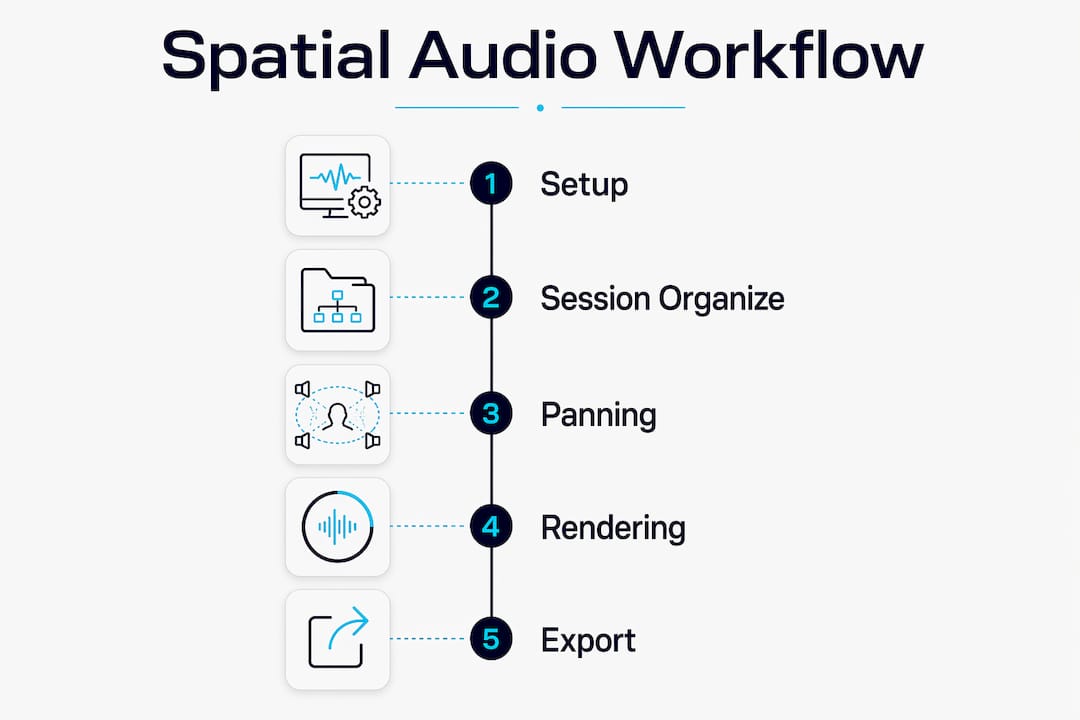
Getting a spatial audio workflow running requires the right software configuration, organized session architecture, and a disciplined approach to testing. Here is a practical breakdown.
DAW and renderer setup
Logic Pro is the most accessible entry point for most producers. Load the Dolby Atmos Renderer plug-in on the master output channel and configure your project for a 7.1.4 bed as the foundation. Pro Tools with the Dolby Atmos Production Suite and Nuendo are the industry standards for larger commercial projects. Each DAW handles object routing differently, so consult Mixanalytic’s Dolby Atmos mixing guide for setup specifics before you start routing tracks.
Session organization
| Element | Recommended approach |
|---|---|
| Bed tracks | Use for ambient layers, reverb returns, and foundational pads routed to the 7.1.4 bus |
| Object tracks | Assign to individual sound sources requiring precise 3D positioning or movement |
| Track labeling | Name every object by instrument and position role (e.g., “Vox Lead Center”) |
| Routing | Keep object count manageable; Dolby Atmos supports up to 118 objects but 20 to 40 is practical for most music sessions |
Spatial panning and automation
Use the built-in spatial panner in Logic Pro or a dedicated plug-in like the Dolby Atmos Music Panner to assign x, y, and z coordinates to each object. Write automation for position changes that align with song structure transitions. Keep automation curves smooth rather than abrupt to avoid jarring spatial jumps.
Export and delivery
Export your session as an ADM BWF (Audio Definition Model Broadcast Wave Format) file for streaming delivery. Apple Music, Amazon Music HD, and Tidal all accept ADM BWF files through their respective distribution pipelines. Verify your loudness targets: Dolby recommends an integrated loudness of -18 LUFS for Atmos music content.
Pro Tip: Run a stereo fold-down check after every major mix revision. If the stereo version sounds unbalanced or thin, the spatial mix likely has a structural problem that needs fixing before delivery.
For ongoing mix testing and spatial field analysis, Mixanalytic’s 3D spatial analysis tools give you measurable feedback on how your mix occupies the three-dimensional field.
Key takeaways
Spatial audio mixing produces its best results when object placement, motion design, and platform translation are treated as equally important creative and technical disciplines.
| Point | Details |
|---|---|
| Beds vs. objects | Use beds for ambient layers and objects for any sound requiring precise 3D positioning or movement. |
| Motion design | Combine macro and micro spatial motion to add vitality without creating masking or distraction. |
| Height placement | Reserve height channels for transient-rich elements like percussion; avoid placing sustained bass content overhead. |
| Platform translation | Test every mix in multiple binaural render modes and on consumer headphones before delivery. |
| Workflow foundation | Configure Logic Pro or Pro Tools with the Dolby Atmos Renderer early and organize tracks by bed or object role from session start. |
Why spatial audio mixing is more than a format upgrade
I have worked with producers who treat spatial audio as a checkbox. They send a stereo mix to an Atmos converter, call it done, and wonder why it sounds flat. That approach misses the entire point.
Spatial audio mixing is a new compositional dimension. When you place a background vocal layer in the surround field and let it breathe independently from the lead, you are making a musical decision as significant as choosing a chord voicing. The space itself becomes an instrument. I have heard mixes where a single, well-placed room ambience object in the height channels transformed a competent track into something genuinely moving. That is not a technical trick. That is craft.
The translation challenge is real and it is underestimated. Apple Music’s rendering behavior, documented by producers in 2026, is a reminder that your mix does not arrive at the listener unchanged. You have to build translation awareness into your process from the first session, not as an afterthought at delivery. The engineers who do this well are the ones who monitor in binaural mode constantly, check stereo fold-downs obsessively, and treat every playback device as a distinct creative constraint.
My honest advice: start with one song, configure Logic Pro properly, and spend time just listening to how placement changes the emotional weight of individual elements. The learning curve is steep for the first session and surprisingly shallow after that. The producers who resist spatial audio because it feels complicated are the same ones who resisted automation in the 1990s. The format is not going away. The skill is worth building now.
— Uygar
How Mixanalytic supports your spatial audio workflow

Spatial audio mixes introduce measurement challenges that standard stereo analysis tools cannot address. Mixanalytic’s free mix analyzer includes 17 AI-driven analysis modules covering frequency balance, dynamic range, and stereo field metrics, giving you objective data on how your mix performs before you commit to delivery. The platform flags spatial and stereo field issues in minutes, not hours, so you can iterate faster without guessing. For producers building out their 3D production skills, Mixanalytic’s spatial audio production tips provide format-specific guidance on Dolby Atmos workflows, binaural monitoring, and translation testing. Check the pricing page for extended analysis access starting at $5.
FAQ
What is the difference between spatial audio and stereo mixing?
Stereo mixing places sounds on a left-right horizontal plane using two channels. Spatial audio mixing uses object-based metadata to position sounds in three dimensions, including height and depth, rendered differently for each playback system.
Do I need special hardware to mix spatial audio?
No specialized hardware is required to start. Logic Pro with the Dolby Atmos Renderer plug-in runs on a standard Mac, and consumer headphones are sufficient for binaural monitoring during early sessions.
Why does my Atmos mix sound different on Apple Music?
Apple Music applies a proprietary binaural renderer that reinterprets your Atmos metadata differently than the Dolby reference renderer in your DAW. Testing your mix in Logic Pro’s near, mid, and far binaural modes before export reduces this gap.
What elements work best as spatial audio objects?
Transient-rich sounds like percussion, vocals, and melodic leads work best as objects because the brain localizes them precisely. Sustained ambient layers and reverb returns are better suited to the bed format.
How loud should a Dolby Atmos music mix be?
Dolby recommends an integrated loudness target of -18 LUFS for Atmos music content delivered to streaming platforms. This is significantly lower than the typical stereo streaming target of -14 LUFS.